 Magi2
PROMPT GUIDE
MAGI-2 Prompt Guide
MAGI-2 can hold a shot for 30 seconds. A vague prompt will make all 30 of them look like nothing happened — here's how to stop that.
Five-part formula · 8 text-to-video templates (4s–10s) · dialogue & lip-sync · image-to-video tips
The five-part prompt formula
Subject
Name one main subject and give it a detail that stays recognizable across the shot. If two people appear, decide whose action the camera follows.
Action
Use a specific verb and give the movement a pace. “Lifts the lid slowly, then pauses” gives the model a visible beat and a place to stop.
Camera
Pick one move per shot: a dolly in, an orbit, a handheld follow, or a static frame. Include the framing or where the move ends.
Light & look
Name the source and texture. Try soft window light with fine 35mm film grain, or one overhead lamp for a low-key look.
Audio
Put the spoken line in quotes, identify the speaker, and name the sounds around them. MAGI-2 generates sound and picture together, including lip-sync.
All five parts, one paragraph. Shot-split control lets you repeat this per shot.
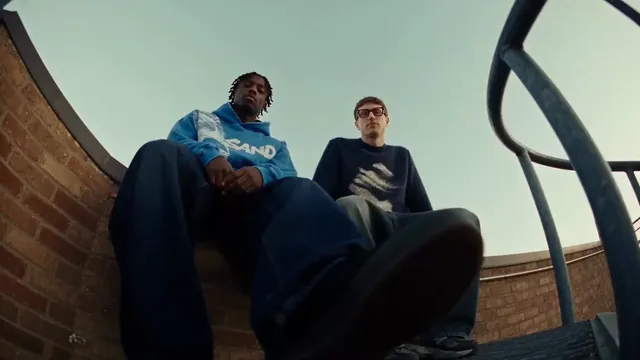 A skateboarder in a blue sweatshirt rolls past a brick wall before the clip cuts to other streetwear looks in directional light.
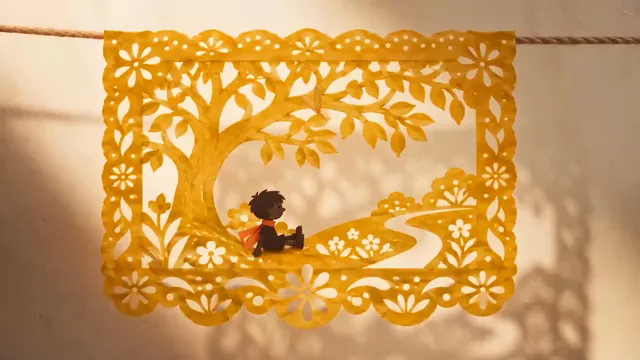 A tiny figure travels through colorful paper-cut panels showing trees, ocean waves, houses, and a crescent moon.
8 copy-ready MAGI-2 prompts
Pick a template, then set its duration (4s or 10s) in the MAGI-2 AI Video Generator. All eight templates run directly in Text-to-Video mode with no uploads required — keep audio enabled for dialogue and sound cues.
Rain-soaked neon street tracking shot
Handheld 35mm tracking shot gliding forward along a rain-slicked city alley at dusk. Warm amber and cyan shop signs shimmer across dark wet asphalt as a lone pedestrian under a clear umbrella walks past steam rising from a street grate. Natural film grain, shallow depth of field. Steady rain hitting asphalt and umbrellas, soft footsteps in shallow puddles, and a distant commuter train rumble.
A single forward tracking move with wet specular reflections and layered ambient sound gives MAGI-2 clear motion and atmosphere across all 10 seconds.
Studio ceramic mug turntable
A cobalt-blue ceramic mug sits on a matte black turntable and turns a smooth quarter rotation, revealing its curved handle. The camera stays locked at table height in close-up. A broad softbox above and to the left draws a clean highlight across the glazed rim against a charcoal background. A quiet motor whirs beneath soft studio room tone.
A quarter turn fits a 4-second clip cleanly, and the locked camera lets the moving highlight describe the glaze and shape.
Two-person dialogue with lip-sync
Two people sit across a small wooden kitchen table at night, one leaning in mid-sentence while the other listens and nods. Handheld camera, slow push toward the speaker's face. Warm tungsten lamp light from the left, cool window light from behind. The speaker says: "I told you the results would change." Quiet room tone with a faint refrigerator hum in the background.
One named speaking role, one quoted line, and a slow push toward the speaker give the dialogue and lip-sync a clear focal point.
Espresso pour macro shot
Macro close-up of rich tiger-striped espresso pouring from a naked portafilter into a pre-warmed clear glass demitasse on a dark walnut bar. Locked camera at cup level as golden crema rises and faint steam curls upward. Warm directional cafe side light with crisp specular highlights. Steady espresso extraction hiss, gentle liquid pour, and soft cafe room tone.
Tight framing and a single continuous physical action make fluid texture, rising crema, and audio detail read clearly in 4 seconds.
Alpine lake sunrise drone reveal
At dawn, a still alpine lake lies hidden behind the crest of a dark pine ridge. A drone glides straight forward above the treetops, clearing the ridge halfway through the shot and revealing the glassy lake with a ribbon of mist across the water. Low sunrise from the right catches the mist and leaves the near trees in shadow, with a natural documentary look. Wind over the ridge fades into distant birdsong as the lake opens into view.
The pine ridge gives the drone an obstacle to clear and the lake gives the 10-second camera move a clear destination.
Anime courier on a rainy street
A bicycle courier in a yellow raincoat walks her bicycle past a closed noodle shop on a rain-soaked street. She slows at the door and tucks a paper delivery receipt under the handle. Track beside her at walking pace in one uninterrupted side view. A warm shop lantern reflects in blue-gray puddles, with hand-drawn anime linework and painted backgrounds. Light rain on the awning, a freewheel ticking, then a paper rustle as she lets go.
A clear physical task gives the stylized character purposeful movement, and the foley shifts naturally when she stops walking.
Direct-to-camera spoken intro with lip-sync
A home cook in a navy apron stands at a bright kitchen counter holding a glass jar of overnight oats, looking directly into camera and smiling naturally. Static eye-level medium close-up. Soft morning window light from camera right, natural skin texture, casual phone-video look. She says: "Mix oats and milk tonight, and breakfast is ready by morning." Quiet kitchen room tone and the soft click as she sets the jar down.
One concise spoken sentence fits a 4-second beat without rushing delivery, anchored by a simple prop action.
Sunlit concrete gallery dolly pan
Slow lateral dolly glide through a minimalist poured-concrete art gallery bathed in late-afternoon sunlight. Tall clerestory windows cast sharp diagonal light beams across pale travertine floors and a single dark bronze sculpture on a pedestal. Clean architectural framing, crisp lens geometry, natural film grain. Quiet reverberant room tone with distant soft footsteps.
A restrained lateral glide keeps architectural lines straight while moving light beams give the 4-second shot depth.
Prompting image-to-video
- Define both ends. The first frame sets the composition and the last frame sets where the motion lands. Give both images a clear subject and describe what changes between them.
- Start with 3–5 references. Keep the same character or product across shots with consistent references. Omni-reference supports up to 20 assets, with up to 10 images, 5 videos, and 5 audio clips. Sand.ai release notes
- Match the target aspect ratio. Prepare reference images in the ratio you plan to generate. A mismatch can crop important details near the edges.
Common prompting mistakes
- Cramming three subjects into one paragraph. Choose one main subject and describe the action the viewer should follow. Give other subjects background roles.
- Asking for two camera moves in one shot. Pick one move so the directions work together. Save a second move for a new shot.
- Leaving dialogue out of quotation marks. Name the speaker and quote the words verbatim. Otherwise, the line may be treated as atmosphere and left unspoken.
- Squeezing a full story into four seconds. Shorten the action to one beat. For dialogue, trim the line before asking the speaker to talk faster.
- Skipping the audio direction. Describe what the soundtrack should contain. Even a quiet scene benefits from a specific sound, such as room tone or a clock ticking.
What each run costs
20 credits per second — subscriptions from $0.141/s to $0.173/s, one-time top-ups from $0.188/s to $0.200/s.
4s = 80 credits10s = 200 credits30s = 600 credits
Draft with 4-second runs, then re-run the winning prompt at 30 seconds.
Frequently asked questions
Does MAGI-2 support negative prompts?
Not documented as of November 25, 2026. Sand AI Platform API reference
Can I control shot timing?
Yes. The full MAGI-2 model supports timeline and shot-cut control. In the Magi2 prompt field, write a time range for each beat and identify the action and camera framing for that range. Sand.ai MAGI-2 release notes
How long should my prompt be?
Start with one paragraph covering subject, action, camera, light and look, and audio. Add details that change what the viewer sees or hears. For a multi-shot clip, use a short paragraph per shot.
Why does my clip look static?
Check whether you gave a main subject a specific visible action and chose one camera move. A clear action can carry a static camera, while a camera move still needs something to move toward or reveal. See the first two common mistakes
Can I use the videos commercially?
You can use paid generations commercially under the Magi2 Terms of Service. Your inputs and outputs must comply with applicable law and respect third-party rights. Terms of Service